Use case 4: Observatory events
[1]:
import showermodel as sm
import numpy as np
This notebook describes how to construct an observatory made of several telescopes using the Observatory class (and subclasses) and how to use the Event class, which calculates the signal of all the telescopes of an observatory. These classes include advanced methods to show the geometry of an observatory that detects a shower.
Construction of an observatory
Observatory is a subclass of list that only accepts objects of type Telescope as arguments. An optional parameter obs_name can also be input to give a name to the observatory. Some general characteristics of the observatory are stored as attributes.
[2]:
telescope0 = sm.Telescope(x=0.1, y=0.2, theta=20., az=-40.)
telescope1 = telescope0.copy(x=0.2, y=0.1)
telescope2 = telescope0.copy(x=-0.3, y=-0.1)
observatory = sm.Observatory(telescope0, telescope1, telescope2, obs_name="My Observatory")

# Some attributes of Observatory objects
print("Observatory name:", observatory.obs_name)
print("Number of telescopes:", observatory.N_tel)
print("Type of telescopes:", observatory.tel_type)
print("Pointing direction:", [observatory.theta, observatory.az])
Observatory name: My Observatory
Number of telescopes: 3
Type of telescopes: generic
Pointing direction: [20.0, -40.0]
Once an Observatory object is constructed, more Telescope objects can be added using the append method. In the example below, the added telescope points to a different direction and thus the observatory pointing is no longer defined.
[3]:
observatory.append(telescope1.copy(x=0., y=0., apert=5., theta=10., az=56.))
print("Observatory name:", observatory.obs_name)
print("Number of telescopes:", observatory.N_tel)
print("Type of telescopes:", observatory.tel_type)
print("Pointing direction:", [observatory.theta, observatory.az])
Observatory name: My Observatory
Number of telescopes: 4
Type of telescopes: generic
Pointing direction: [None, None]
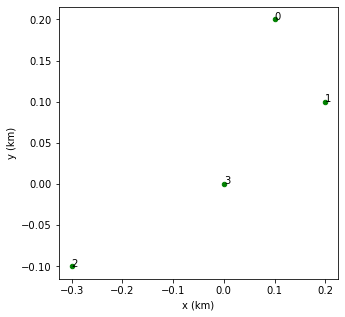
The show method makes a 2D plot of telescope positions and indexes.
[4]:
observatory.show();
Constituent Telescope objects can be accessed via an index (starting at 0). This allows you to both get and set telescope attributes.
[5]:
print("# Before changes")
print("Pointing of last added telescope:", [observatory[-1].theta, observatory[-1].az])
print("Observatory pointing direction:", [observatory.theta, observatory.az])

# Now, the pointing of the last-added telescope is set to be the same as the other ones
observatory[-1].theta = observatory[0].theta
observatory[-1].az = observatory[0].az
print("# After changes")
print("Pointing of last added telescope:", [observatory[-1].theta, observatory[-1].az])
print("Observatory pointing direction:", [observatory.theta, observatory.az])
# Before changes
Pointing of last added telescope: [10.0, 56.0]
Observatory pointing direction: [None, None]
# After changes
Pointing of last added telescope: [20.0, -40.0]
Observatory pointing direction: [20.0, -40.0]
Instead of changing the pointing directions of the individual telescopes, the method set_pointing allows you to set the pointings of all the telescopes of the observatory at a time.
[6]:
observatory.set_pointing(theta=30., az=15.)
print("Pointing of first telescope:", [observatory[0].theta, observatory[0].az])
print("Observatory pointing direction:", [observatory.theta, observatory.az])
Pointing of first telescope: [30.0, 15.0]
Observatory pointing direction: [30.0, 15.0]
Help on Observatory.
[7]:
# sm.Observatory?
Predefined observatories: Array25
Array25 is a subclass of Observatory that generates an observatory consisting of 25 telescopes in a circular layout. The input parameters and their default values are:
obs_name: Name given to the observatory. Default ‘Array25’.telescope:Telescopeobject to be used to construct the observatory. If None, a telescope of typetel_typeis used. Default None.tel_type: Type of telescope to be used whentelescope==None. Default ‘IACT’.x_c,y_c,z_c: East, north and height (from ground) coordinates in km of the center of the array. Default (0, 0, 0).R: Radius in km of the array. Default 341.rot_angle: Rotation angle in degrees of the array (clockwise from north). Default 0.theta, [alt],az: Zenith, altitude and azimuth angles in degrees of the observatory pointing direction. Eitherthetaoraltcan be specified, but ifaltis given,thetais overwritten. Default (0, None, 0).
[8]:
# Default Array25 object
# observatory = sm.Array25()

# Setting the center position, including height, radius, pointing direction and rotation angle (see plot below)
observatory = sm.Array25(x_c=0.2, y_c=0.2, z_c=0.5, R=1., theta=20., az= 120., rot_angle=15.)

print("Observatory name:", observatory.obs_name)
print("Number of telescopes:", observatory.N_tel)
print("Type of telescopes:", observatory.tel_type)
print("Center of the array:", [observatory.x_c, observatory.y_c, observatory.z_c])
print("Pointing direction:", [observatory.theta, observatory.az])

observatory.show();
Observatory name: Array25
Number of telescopes: 25
Type of telescopes: IACT
Center of the array: [0.2, 0.2, 0.5]
Pointing direction: [20.0, 120.0]
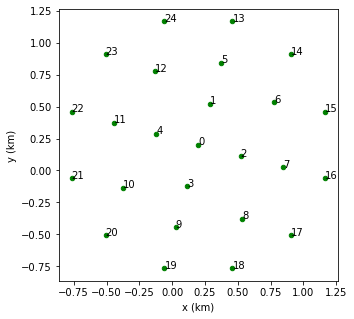
The default telescope type is ‘IACT’, but the observatory can be constructed using a different predefined telescope or a customized telescope via the parameters tel_type and telescope, respectively.
[9]:
#telescope = sm.Telescope(theta=30., az= 10., apert=15., area=50.) # Instead of the default IACT telescope
#observatory = sm.Array25(telescope=telescope, R=1., theta=20., az= 120.)  # theta and az are overwritten
Help on Array25.
[10]:
# sm.Array25?
Predefined observatories: Grid
Grid is another subclass of Observatory that genereates a rectangular grid of telescopes. The input parameters and their default values are:
obs_name: Name given to the observatory. Default ‘Grid’.telescope:Telescopeobject to be used to construct the observatory. If None, a telescope of typetel_typeis used. Default None.tel_type: Type of telescope to be used whentelescope==None. Default ‘GridElement’.x_c,y_c,z_c: East, north and height (from ground) coordinates in km of the center of the array. Default (0, 0, 0).size_x,size_y: Size of the grid in km along the x and y directions. Default (2., 2.).N_x,N_y: Number of cells across the x and y directions. Default (10, 10).theta, [alt],az: Zenith, altitude and azimuth angles in degrees of the observatory pointing direction. Eitherthetaoraltcan be specified, but ifaltis given,thetais overwritten. Default (0, None, 0).
In this case, the default telescope type is GridElement, which has an aperture of 180 degrees around zenith direction and a 100 % detection efficiency in the 290 - 430 nm wavelength interval.
[11]:
# Default Grid object
observatory = sm.Grid()

# Some attributes of Grid
print("Observatory name:", observatory.obs_name)
print("Number of telescopes:", observatory.N_tel)
print("Type of telescopes:", observatory.tel_type)
print("Center of the array:", [observatory.x_c, observatory.y_c, observatory.z_c])
print("Cell area in m^2:", np.around(observatory.cell_area))

observatory.show();
Observatory name: Grid
Number of telescopes: 100
Type of telescopes: GridElement
Center of the array: [0.0, 0.0, 0.0]
Cell area in m^2: 40000.0
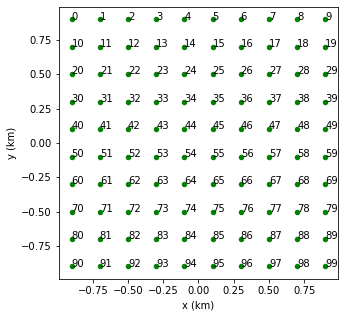
A Grid object is generated when using the show_distribution method of Shower (see UC3). In fact, an existing Grid object can be passed to show_distribution.
[12]:
#shower = sm.Shower(theta=20., az=30.)
#grid = sm.Grid(tel_type='IACT', theta=19., az=31., size_x=4., size_y=4., N_x=10, N_y=10)
#shower.show_distribution(grid=grid);

# Equivalent procedure
#shower.show_distribution(tel_type='IACT', theta=20., az=31., size_x=4., size_y=4., N_x=10, N_y=10);
Help on Grid.
[13]:
# sm.Grid?
Observatory events
Event calculates the signals of all the telescopes of an observatory that detects a shower. Therefore, an Event object is constructed from a Shower object and an Observatory object. In addition, this class has the same optional parameters as Signal (see UC3):
atm_trans: Include the atmospheric transmision. Default True.tel_eff: Include the telescope efficiency. If False, 100% efficiency is assumed within the wavelength interval given bywvl_ini,wvl_finandwvl_step. Default True.wvl_ini,wvl_fin,wvl_step: Wavelength interval and discretization step in nm to calculate the signal whentel_eff=False. Default [290, 430] interval with 3 nm step.
[14]:
shower = sm.Shower(x0=0.2, y0=0.1, theta=20., az=45.)
observatory = sm.Array25(R=1., theta=22., az= 45.)
# Including both atmospheric transmission and telescope efficiency by default
event1 = sm.Event(observatory, shower)
# Both atmospheric transmission and telescope efficiency are turned off
# The default wavelength interval is kept
event2 = sm.Event(observatory, shower, atm_trans=False, tel_eff=False)

# Equivalent method of Shower
#event1 = shower.Event(observatory)
#event2 = shower.Event(observatory, atm_trans=False, tel_eff=False)
Event contains the constituent Shower and Observatory objects as well as two lists named projections and signals, containing respectively the Projection and Signal objects corresponding to each telescope. This way, you may access the properties of telescopes and signals by an index.
Like in Signal, the Atmosphere, Track, Profile, Cherenkov and Fluorescence objects associated to Shower can be accessed as attributes of Event.
[15]:
signals1 = event1.signals
signals2 = event2.signals
projections = event1.projections # Equivalent to projections = event2.projections

print("Position of sixth telescope:", np.around([observatory[5].x, observatory[5].y, observatory[5].z], 3))
print("Total number of photoelectrons in sixth telescope:", np.around(signals1[5].Npe_total_sum))
print("The same but without atmospheric transmission or detection efficiency:", np.around(signals2[5].Npe_total_sum))

projections[5]

# Accessing the track and the profile
#event1.track  # Equivalent to event1.shower.track
#event1.profile.show();
Position of sixth telescope: [0.    0.667 0.   ]
Total number of photoelectrons in sixth telescope: 59.0
The same but without atmospheric transmission or detection efficiency: 209.0
[15]:
| distance | alt | az | theta | phi | beta | time | FoV | |
|---|---|---|---|---|---|---|---|---|
| 0 | 0.594699 | 9.931877 | 157.263955 | 88.847341 | 198.586391 | 88.026633 | 1.910484 | False |
| 1 | 0.640521 | 28.712512 | 150.198384 | 68.942729 | 197.920523 | 68.111420 | 1.335127 | False |
| 2 | 0.749791 | 43.157349 | 142.628357 | 53.278761 | 197.261767 | 52.436963 | 0.971408 | False |
| 3 | 0.899679 | 52.945869 | 134.782324 | 42.199367 | 196.610181 | 41.347193 | 0.743180 | False |
| 4 | 1.073302 | 59.327879 | 126.944395 | 34.487429 | 195.965814 | 33.624993 | 0.594121 | False |
| ... | ... | ... | ... | ... | ... | ... | ... | ... |
| 545 | 119.000741 | 70.115662 | 45.767436 | 2.133327 | 139.865614 | 0.286164 | 0.000041 | True |
| 546 | 119.219048 | 70.115453 | 45.766023 | 2.133055 | 139.853575 | 0.285640 | 0.000031 | True |
| 547 | 119.437355 | 70.115245 | 45.764615 | 2.132785 | 139.841577 | 0.285117 | 0.000022 | True |
| 548 | 119.655662 | 70.115038 | 45.763212 | 2.132515 | 139.829620 | 0.284597 | 0.000013 | True |
| 549 | 119.873969 | 70.114831 | 45.761815 | 2.132247 | 139.817703 | 0.284079 | 0.000004 | True |
550 rows × 8 columns
Help on Event.
[16]:
# sm.Event?
Special methods of Event
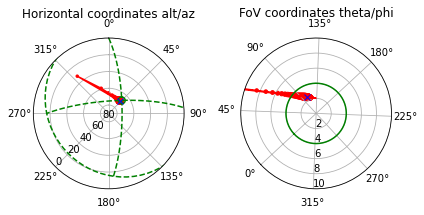
In the first place, Event has the method show_projection that is equivalent to that of Shower (see UC2), with the difference that it uses one of the telescopes of the observatory from which the Event object was generated. The telescope has to be specified by the parameter tel_index (default 0). Like in Shower, the red circles represent the shower points, the radii being proportional to the energy deposited in each step length (this default option can be deactivated
setting shower_Edep=False). The blue mark is at the position of the depth of maximum by default, but a different slant depth can be input via the parameter X_mark.
[17]:
shower = sm.Shower(x0=0.2, y0=0.1, theta=20., az=45.)
observatory = sm.Array25(R=1., theta=22., az= 45.)
event = sm.Event(observatory, shower)

event.show_projection(tel_index=2, max_theta=10.);
Help on show_projection method.
[18]:
# event.show_projection?
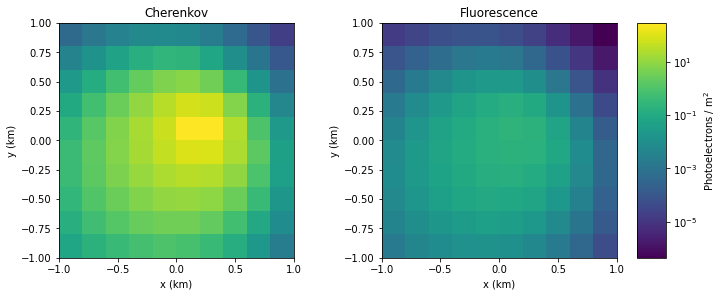
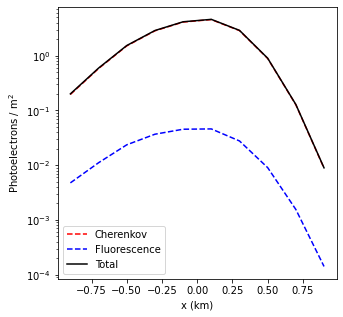
Event has also the show_distribution method equivalent to that of Shower (see UC3), but it uses one of the telescopes of Event to generate the Grid object for which the distribution is calculated. Again, the telescope is selected via the parameter tel_index (default 0). The grid is centered at the position of such telescope and has the same pointing direction. In addition, the default values of atm_trans and tel_eff are those of the Event object, although they
can be modified. In case of tel_eff=False, the wavelength interval can be selected via the paramters wvl_ini, wvl_fin and wvl_step.
[19]:
shower = sm.Shower(x0=0.2, y0=0.1, theta=20., az=45.)
observatory = sm.Array25(R=1., theta=22., az=45.) # Centered at (0, 0, 0)
event = sm.Event(observatory, shower) # Both atmospheric transmission and telescope efficiency included

# 2D distribution centered at (0, 0 ,0). The pointing direction is theta=22, az=4
# The aperture and efficiency are those of a telescope of type IACT
event.show_distribution(size_x=2., size_y=2., N_x=10, N_y=10);

# 1D distribution along the x direction centered at the position of telescope 9
event.show_distribution(tel_index=9, size_x=2., size_y=0.2, N_x=10, N_y=1);
tel = event.observatory[9]
print("Position of telescope 9:", np.around([tel.x, tel.y, tel.z], 3))
Position of telescope 9: [ 0. -0.667 0. ]
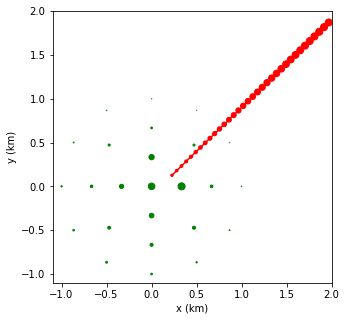
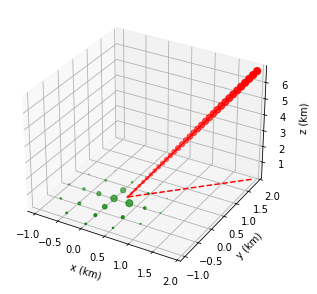
There also two new methods named show_geometry2D and show_geometry3D that allow you to visualize the geometry of an observatory event in a 2D plot and a 3D plot, respectively. By default, a square area of 1x1 km\(^2\) centered at the origin of coordinates is shown, but this can be changed via the optional parameters x_min, x_max, y_min and y_max. Like in show_projection, the shower points are represented by red circles of size proportional to the energy deposit
by default (parameter shower_Edep). The telescope positions are represented by green circles of size proportional to the signal by default (parameter signal_size). In addition, in the 3D plot, the vertical projection of the shower track on ground is represented by a dashed red line (parameter xy_proj).
[20]:
# Setting visualization area at ground level
event.show_geometry2D(x_min=-1.1, x_max=2., y_min=-1.1, y_max=2.);
event.show_geometry3D(x_min=-1.1, x_max=2., y_min=-1.1, y_max=2.);
More options of show_geometry2D and show_geometry3D are described in the help.
[21]:
#event.show_geometry2D?
#event.show_geometry3D?
[ ]: